- Home
- About
- Academics
- Admissions
- Students
- Tuition & Aid
- Alumni & Giving
The Free Application for Federal Student Aid (FAFSA) is your gateway to federal, state, and institutional financial aid. Before getting started, you and any required contributors (such as a parent or spouse) will need to create a StudentAid.gov account.
Morris Brown College FAFSA School Code: 001583
Every contributor—anyone (you, your spouse, a biological or adoptive parent, or your parent’s spouse) who’s required to provide information on the FAFSA form—needs a StudentAid.gov account before accessing and completing their section of the online form. We strongly recommend you and your contributor(s) create StudentAid.gov accounts before starting your FAFSA form. When you create your account, be careful to enter your name and Social Security number (SSN) exactly as they appear on your Social Security card. You and your contributors can access the StudentAid.gov account by using an FSA ID (account username and password).
Note: Contributors without an SSN can create a StudentAid.gov account too to fill out their portion of your FAFSA form online.
To start the online FAFSA form, select “Log In To Start.” You’ll be taken to the “Log In” page to enter your account username and password. After logging in, you’ll be given the option to select your applicable role to fill out the FAFSA form: “Student” or “Parent.” You (the student) should select “Student.” If a parent wants to start their dependent child’s FAFSA form, they should select the “Parent” option.
You might need the following information or documents as you fill out the FAFSA form:
Keep these records! You may need them again. Do not mail these supporting records to us unless otherwise instructed to do so.
One thing you don’t need for the FAFSA® form is money! The FAFSA form is FREE, so if a website asks you to pay to fill it out, you’re not dealing with the official FAFSA site. Remember, this is a government application, so it’s on a .gov website.
The 2025–26 FAFSA form is available now for the award year that runs from July 1, 2025, to June 30, 2026. We encourage you to fill out the form as soon as possible on or after the applicable FAFSA launches to meet FAFSA federal, state, and school deadlines.
FAFSA® Filing Options
You may choose any of these methods to file a FAFSA form:
If you are starting the FAFSA form for the first time on fafsa.gov, select “Log In To Start” and enter your account username and password to access the FAFSA form.
If you are applying for a summer session, contact the financial aid office at your college or career/trade school to find out which school year you should select when you complete your FAFSA form.
While completing the FAFSA form, you must list at least one school to receive your information. The schools you list will use your FAFSA information to determine the types and amounts of student aid you may receive. Use the School Search to find the colleges or career/trade schools you’re interested in including on your FAFSA form. Morris Brown College School Code: 001583
For federal student aid purposes, the order of schools for your college list does not matter. However, to be considered for state aid, some states require you to list schools in a particular order (for instance, you might need to list a state school first). Find out whether your state has a requirement for the order in which you list schools on your FAFSA form.
You can list up to 20 schools online or up to 10 schools on a FAFSA PDF. (You can add or delete schools on your FAFSA form later.) Schools you list on the application will automatically receive your FAFSA results electronically.
Note: Schools will not be able to see which other schools you listed on your FAFSA form.
You should add any school that you plan on applying to, or that you have applied to, even if you haven’t been accepted yet. In most cases, once a school accepts you, they will then work on developing your aid offer.
After you complete your required section of the FAFSA form online, you’ll acknowledge the terms and conditions of the form and electronically sign your section. You can then submit your section of the FAFSA form. However, your FAFSA form won’t be considered complete until all required contributors provide their information on the FAFSA form, give their consent and approval to transfer federal tax information into the form, and provide their signatures.
After you and your parent (and/or any other required contributor) sign and submit the FAFSA form, the form will be considered complete and will be submitted for processing.
If you submit the FAFSA form, you’ll see a confirmation page that displays your completion date, data release number, and next steps. You’ll also see your estimated Student Aid Index, estimated Federal Pell Grant eligibility, and information about other federal student aid for which you may be eligible. This confirmation page is emailed automatically to you for your records.
Note: The Student Aid Index on the confirmation page is only an estimate. The official Student Aid Index will appear on the FAFSA Submission Summary.
Top FAFSA® Tips
If you need help filling out the FAFSA form, use these free tools:
The FAFSA form asks a series of questions that determine whether you are a dependent or independent student for purposes of applying for federal student aid. If you are a dependent student, you must report parent information, as well as your own information, on your application. If you’re curious, you can find out now whether you’re a dependent student.
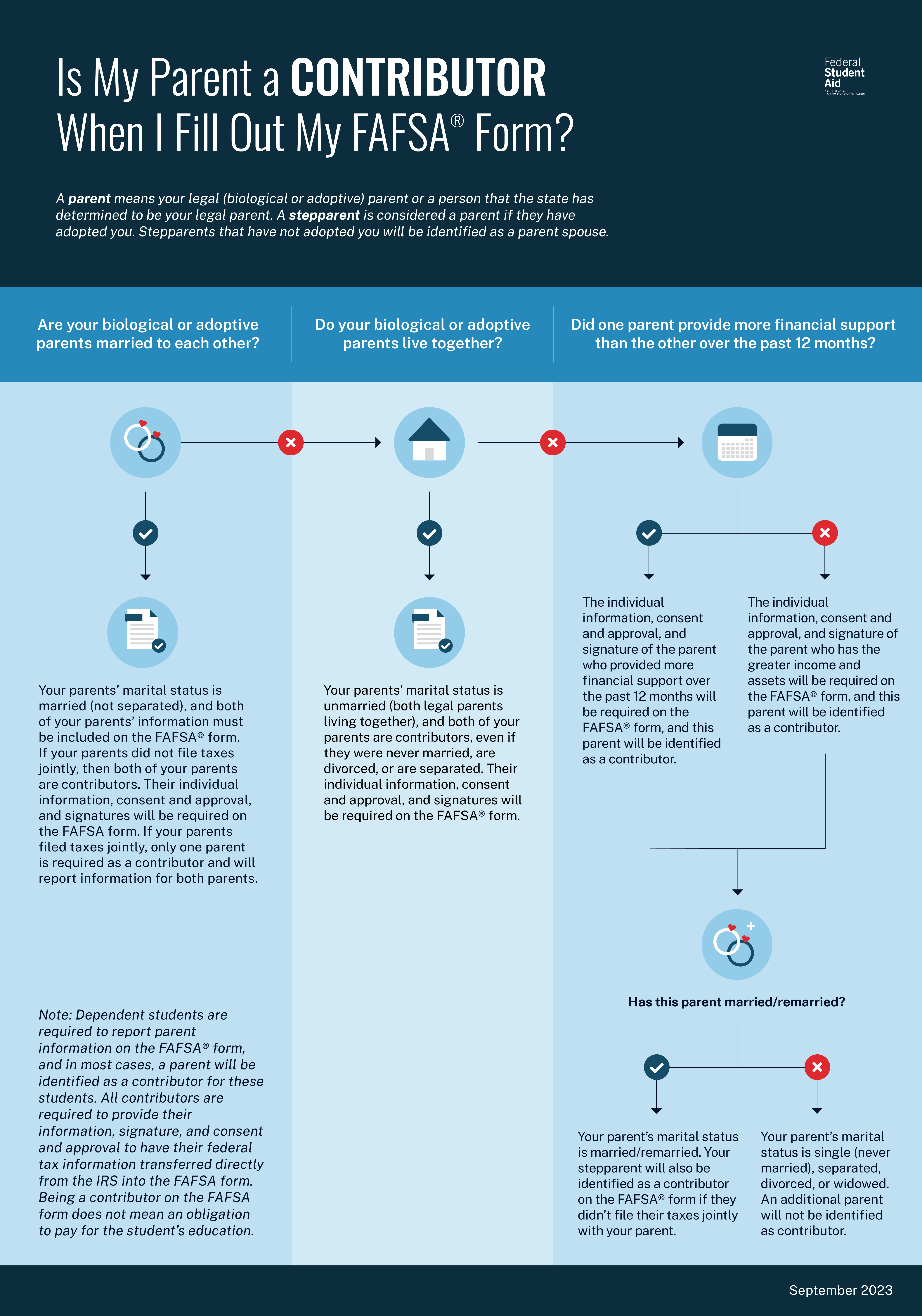
If you’re a dependent student, you’ll need to report parent information on your FAFSA form. Visit our page on reporting parent information to find out who counts as your parent, what to do if you don’t live with your parents, and what to do if you don’t have access to your parents’ financial information.
Try These Resources
Who’s My FAFSA Parent? wizard—Identifies which parent(s) will be a required contributor on the FAFSA form.
Is My Parent A Contributor When I Fill Out My FAFSA® Form? graphic—Helps dependent students determine which parent’s information to include in the FAFSA form.
If you are married (and not separated) and filed taxes jointly with your spouse, then you’ll report your spouse’s information on the FAFSA form, but they will not be identified as a contributor. But if you’re married (and not separated) and didn’t file taxes jointly with your current spouse, your spouse will be considered a contributor on your FAFSA form.
The FAFSA form asks for financial information, including information from tax forms and balances of savings and checking accounts.
Note: If your or your family’s financial situation has changed significantly from what is reflected on your federal income tax return (for example, if you’ve lost a job or otherwise experienced a drop in income), you may be eligible to have your financial aid adjusted. Complete the FAFSA questions as instructed on the application, submit your FAFSA form, then contact the school you plan to attend to discuss how your current financial situation has changed. Note that the school’s decision is final and cannot be appealed to the U.S. Department of Education.
What to Do If Your Parents’ (or Your) Marital Status Has Changed Since Taxes Were Filed
Here are some tips for this type of situation using the example of the 2025–26 FAFSA form:
The FAFSA help text covers all these situations in more detail as you’re filling out the application.
Automatically Transferring Your Tax Information
Your contributor’s federal tax information will be transferred from the IRS into your FAFSA form.
All contributors must provide consent and approval for the U.S. Department of Education to
NOTE: Even if contributors don’t have an SSN, didn’t file taxes, or filed taxes outside of the U.S., they will still need to provide consent and approval.
IMPORTANT: If a required contributor doesn’t provide consent and approval to have their federal tax information transferred into the FAFSA form, you (the student) will not be eligible for federal student aid—even if the contributor manually enters tax information into the FAFSA form.
To ensure the information is secure, the federal tax information won’t display on the FAFSA site or the FAFSA Submission Summary.
Once you’ve completed your FAFSA form, there are more steps you have to take before you receive financial aid. Make sure you know what happens after you submit your FAFSA form.